安装依赖
参考Hugo官网安装教程,注意安装Hugo之前需安装Go和Git
本地部署
首先生成一个本地文档
hugo new site personal-site
由此可以得到以下目录:
personal-site
├── archetypes # 新文章默认模板
├── config.toml # 配置文档
├── content # 存放所有Markdown格式的文章
├── data
├── layouts # 存放自定义的view,可为空
├── static # 存放图像、CNAME、css、js等资源,发布后该目录下所有资源将处于网页根目录
└── themes # 存放下载的主题
新建一个github repo,必须是[username].github.io,比如johnjim0816.github.io,把上面personal-site文件夹下的所有文件复制到这个repo中。
然后执行以下命令就可以新建文章了:
hugo new posts/test.md # 新建一个名为test的文章
然后执行:
hugo server
就可以在本地(一般是http://localhost:1313/)看文章效果了。
如果没有问题,执行hugo命令就会生成网页在public子目录中。
添加主题
添加主题可以使用git submodule的形式如下:
git submodule add https://github.com/budparr/gohugo-theme-ananke.git themes/ananke # ananke主题
然后在config.toml中增加以下命令,主题就生效了:
theme = "ananke"
至于主题推荐则另外说明,主要这里主题是以子模块的形式添加的,方便更新主题,但是删掉子模块也不容易,包括以下步骤:
1. 删除子模块目录,通常是主题名称
vim .gitmodules 然后删除子模块相关
vim .git/config 删除子模块相关
删除.git/modules下面的所有子模块相关
网页部署
Github Pages
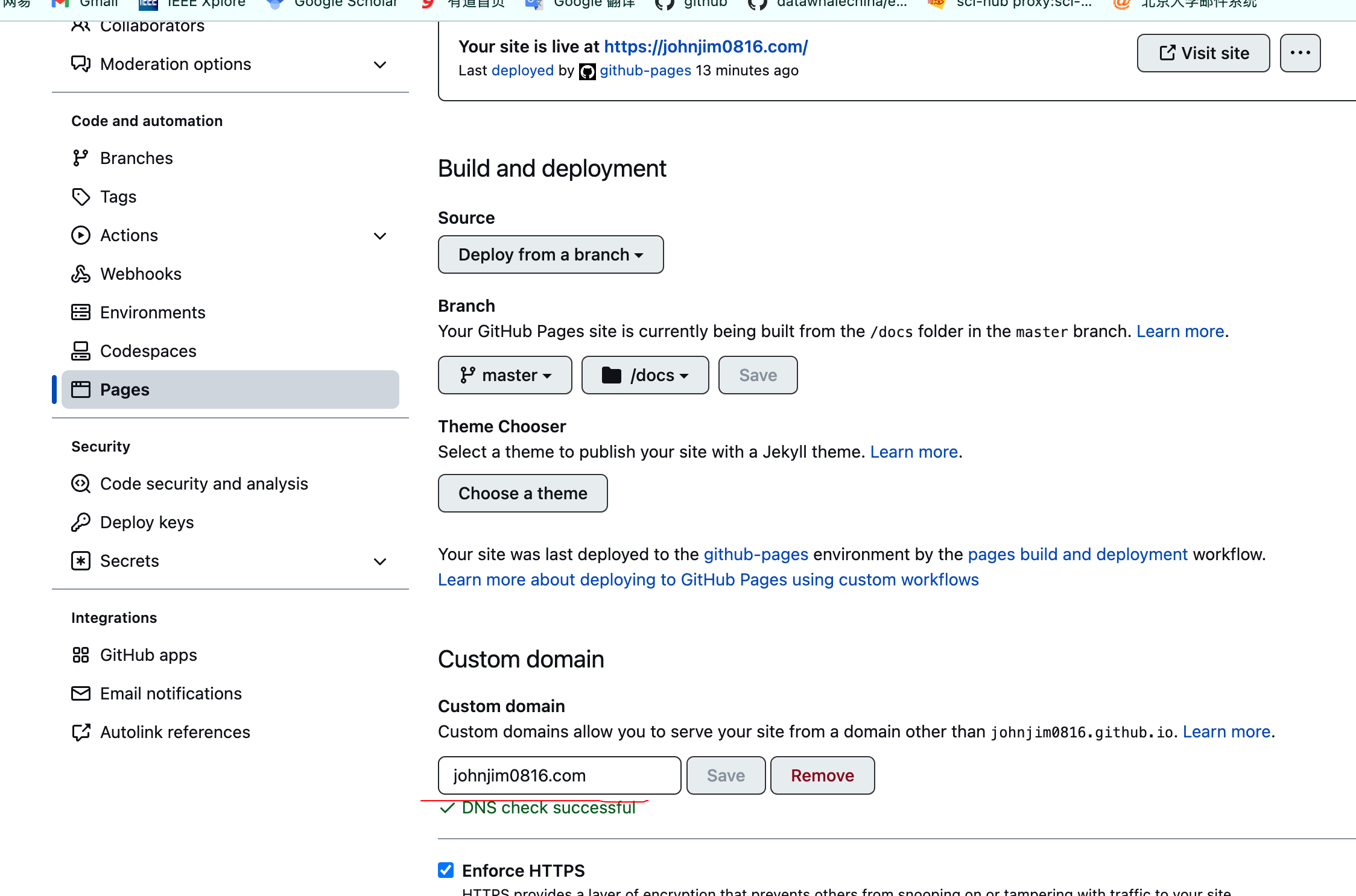
参考这个链接,我选择了本地文档和网页文档放在一块(尝试过分开,但太痛苦了,不熟悉Git的话会有很多莫明的bug),在config.toml中增加一行publishDir = "docs"(不加这个网页文档就会生成到public文件夹下,然而没办法指定public文件夹为Pages的source),这样生成的网页文档就会在docs文件夹下,然后在网页上指定一下Pages的source就可以了,如下图:

GitHub Actions自动部署
参考这个链接,仓库下新建一个.github/workflows/pages.yml 文件,内容如下:
name: Deploy Hugo site to GitHub Pages

on:
  push:
    branches: [ master ]    # 如果你的默认分支不是 main,这里改成你的分支名
  workflow_dispatch:

permissions:
  contents: read
  pages: write
  id-token: write

concurrency:
  group: "pages"
  cancel-in-progress: true

jobs:
  build:
    runs-on: ubuntu-latest
    steps:
      - name: Checkout
        uses: actions/checkout@v4
        with:
          submodules: true      # 如果主题用 submodule,这个必须是 true
          fetch-depth: 0

      - name: Setup Hugo
        uses: peaceiris/actions-hugo@v3
        with:
          hugo-version: '0.151.0'   # 换成你本地确认可用的稳定版本
          extended: true

      # 如果你有 Tailwind/PostCSS/ESBuild 等前端步骤,取消注释以下两步
      # - name: Setup Node
      #   uses: actions/setup-node@v4
      #   with:
      #     node-version: 20
      # - name: Build frontend assets
      #   run: npm ci && npm run build

      - name: Build
        env:
          HUGO_ENV: production
        run: hugo --gc --minify

      - name: Upload artifact
        uses: actions/upload-pages-artifact@v3
        with:
          path: ./public

  deploy:
    needs: build
    runs-on: ubuntu-latest
    environment:
      name: github-pages
      url: ${{ steps.deployment.outputs.page_url }}
    steps:
      - name: Deploy to GitHub Pages
        id: deployment
        uses: actions/deploy-pages@v4
然后push到github上即可。
自定义域名
买一个域名,添加三个解析记录,如下,其中上面两个记录值就是ping johnjim0816.github.io得到的ip地址。

然后直接在github repo的pages页面添加你自定义的域名保存,等到DNS check成功即可: